

ZEROBASEONE
2024 ZEROBASEONE THE FIRST TOUR [TIMELESS WORLD] IN JAPAN
ZEROSE JAPAN Members First Sale- electronic ticket
Reception overview
- Reception period
- October 4, 2024 (Friday) 12:00 to October 9, 2024 (Wednesday) 23:59
- Winner announcement
- Friday, October 18, 2024 13:00
- Deposit period
- October 18, 2024 (Friday) 13:00 - October 21, 2024 (Monday) 23:59
- Application conditions
-
-
[Applicant] Anyone who joins ZEROSE JAPAN (regardless of year or month course)
*This also applies to those who join now.
[Accompanying person] Anyone can join, including non-FC members.
* Plus member ID (free) is required when applying. If you are joining ZEROSE JAPAN please use your registered Plus member ID.
≫Click here to join the official fan club
≫ Click here to register for Plus member ID (free)
*Before applying, both the applicant and accompanying person must check the registration information on [My Page].
Before applying, please be sure to register your name, date of birth, gender, address, telephone number, and email address.
- Those who are registered as members of each fan club by credit card payment
-
- Please be sure to check that the registered card information (card number and expiration date) is correct.
If your registered card information has not been updated (if your card information is not the latest), your membership will be unintentionally withdrawn, and you will not be eligible for the lottery because you will not be able to meet the application conditions for the fan club membership advance application you applied for. Please note that there may be
- Number of applications
-
Maximum 2 tickets per person per performance
*If you apply for two tickets, an electronic ticket will be issued to each applicant and accompanying person's device.
*Please make sure that accompanying persons also have a smartphone that meets the recommended environment for the "Ticket Plaza Electronic Ticket" app.
*When applying for two tickets, you must specify a companion. - Number of applications
- Applications are limited to one per person, up to a maximum of five performances.
*If you apply as an accompanying person, this will only be counted as one application.
*Duplicate applications for the same performance may be invalid.
*If you switch applicants/companions for the same performance, or apply separately from other applicants/companions, you may be disqualified. Please consult with your companions in advance and apply as the representative only. - Ticket price
-
Reserved seat: 13,200 yen (tax included)
*A separate ticket agency fee will be charged.
* Fee required for ages 3 and over, no admission for children under 3
-
Please enter the following information on the application screen:
Information about accompanying persons- (1) Your companion's Plus member ID
*Even if your companion does not have a smartphone, they will need to register for Plus member ID (free of charge). - (2) [Smartphone phone number] of the accompanying person who will display the ticket
- (3) Name of accompanying person (kana)
If you enter an incorrect Plus member ID or specify the applicant's Plus member ID as a companion, your application may be rejected. Please check carefully before applying.
Before applying, please be sure to register your name, date of birth, gender, address, telephone number, and email address. - (1) Your companion's Plus member ID
About electronic tickets
Check e-ticket details
E-tickets can be issued using the "Ticket Plaza E-Ticket" app.
More details will be provided after ticket issuance.
electronic ticket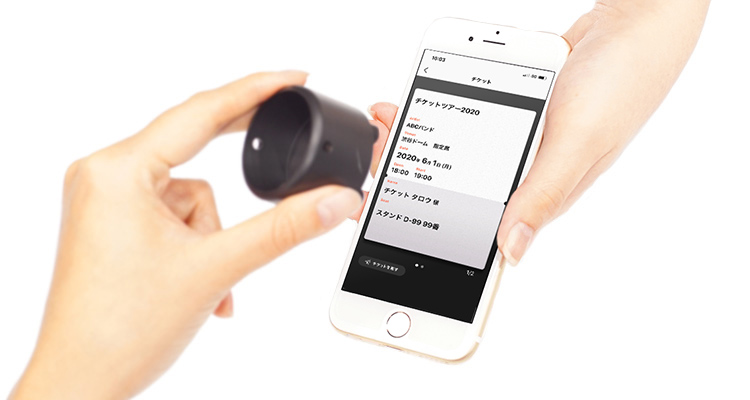 |
Ticket display date | Approximately one week before the performance date *Scheduled Seat locations will be displayed on the day of the performance. |
|---|---|---|
| Ticket display terminal | If both the applicant and accompanying person apply for two tickets, electronic tickets will be issued for each smartphone. |
|
| Distribution of tickets | This advance ticket cannot be distributed. | |
| ticket trade | can be Please check here for more information. |
About admission on the day
No one other than yourself will be allowed to enter. We will not accept changes for any reason, so please be careful not to make any mistakes or omissions when applying.
≫ For ZEROSE JAPAN members, click here
*On the day of the performance, please bring an ID with your new name written on it.Click here for information on facial photo registration
Click here for more information on face photo registration
About identity verification documents
- Please bring one photo with your face. This applies to the following:
-
*Copying of all items is not permitted. Please bring the actual item within the expiry date.
(1) Passport
(2) Driving license/international driving license
(3) Official license with photo (marine, aviation, architect, etc.)
(4) Basic resident register card
(5) Physical disability certificate
(6) Residence card or special permanent resident certificate
(7) My number card (notification card is not accepted)
(8) Welfare notebook
(9) Photo insurance card
(10) Student ID card with photo
(11) Rehabilitation notebook
- If you have any official identification other than (1) to (11) above, please contact Chikepura customer support at least 2 days before the performance.
- If you do not have any of the above (1) to (11) or what appears to be an official ID, please bring the following documents.
- *When using your personal number card (My Number Card) as an identification card, please present only the front side (the one with the photo). Please be careful not to present the back side (the side with your personal number printed on it).
Please note that we do not look at the back of your personal number card (My Number Card) when verifying your identity. - *Individual number (My Number) notification cards (paper cards with an individual number printed on them and without a photo) cannot be used as identification documents.
- *Please note that student ID cards for those over 19 years old will not be accepted, even if they have a photo of the person's face.
- *If you have a student ID/insurance card that does not have a photo of your face, please see <If you do not have a photo of your face>.
- *Please note that identity verification documents that are photocopied, handwritten, expired, or have been altered to make them unusable will not be accepted.
- If you do not have a photograph of your face
-
<Please bring two official certificates>
■What corresponds to an official certificate
Insurance card, resident card, family register copy, family register extract, seal registration certificate, pension notebook
- *Please bring all official certificates in their officially issued condition.
- Additionally, certificates of residence, certified copies of family registers, and extracts of family registers are valid within six months of issuance.
<Please bring one official certificate and at least one document with your name printed>
*You cannot enter with just one official ID.■Items with names printed on them
Employee ID, student ID without photo, credit card, cash card
- *Utility bills (electricity/water, etc.) and various mail items are invalid even if your name is printed on them.
■Things that are not accepted as identification documents
It is prohibited by law to lend or borrow your health insurance card.
The use of fraudulent or forged identification documents are all criminal acts.
Regarding support for accompanying persons under the age of 18 who do not have a smartphone
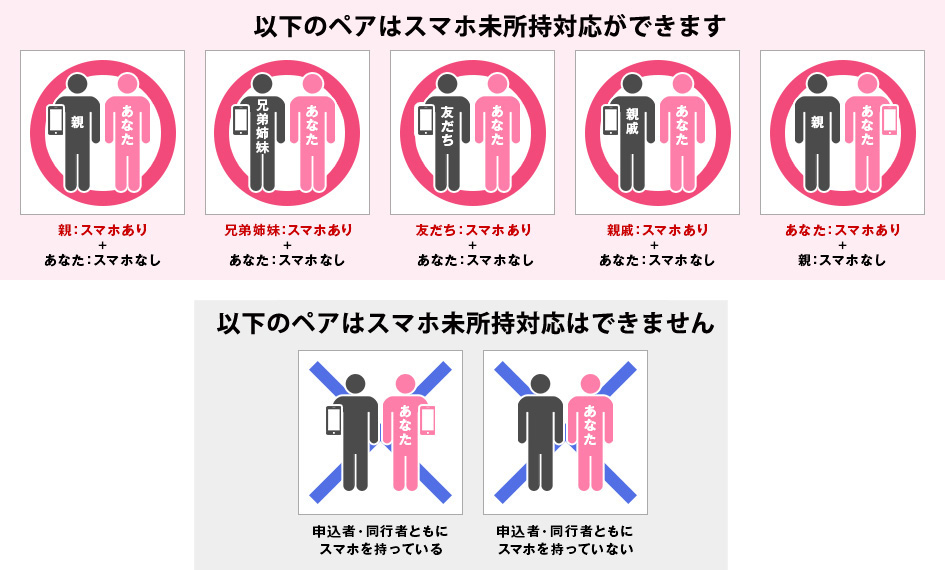
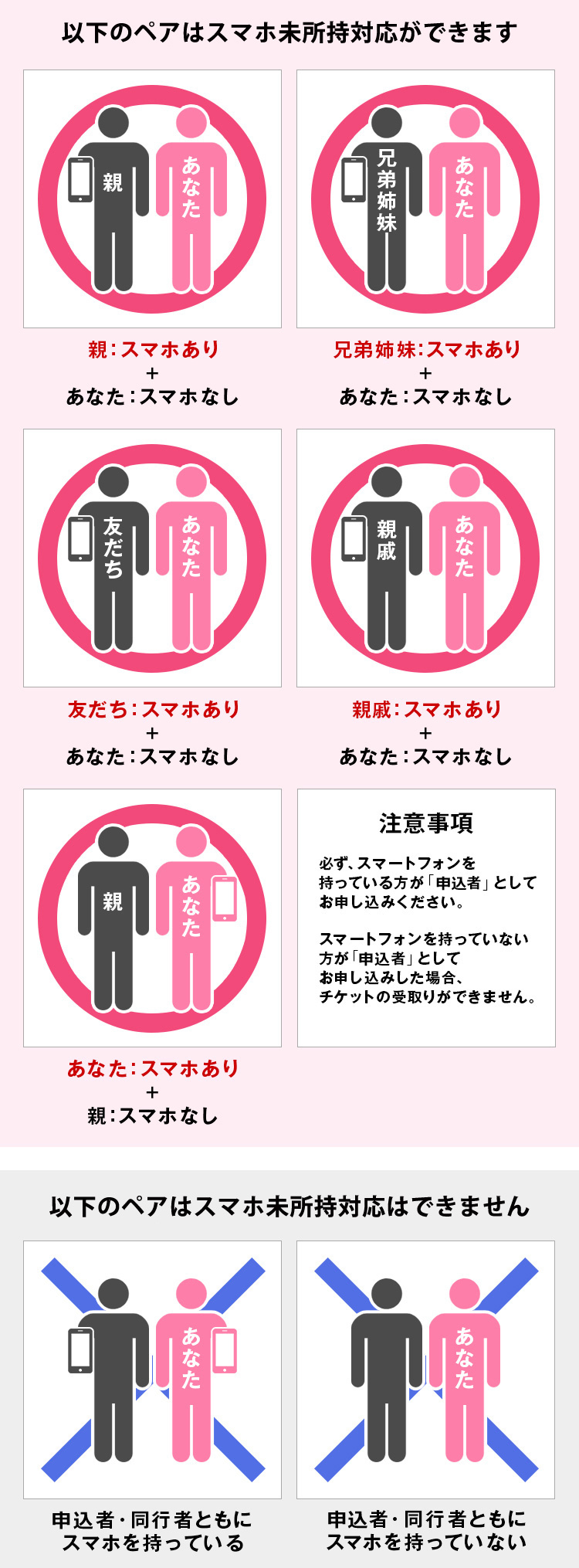
Compatible with companions under the age of 18 who do not own a smartphone
If a companion under the age of 18 does not have a smartphone, you can display two tickets together on the applicant's smartphone and enter the venue with the companion.
However, you may be required to separately verify your identity with a valid ID upon entry.
- *If the applicant is unable to come, a companion who does not have a smartphone will not be able to enter.
- *If the applicant is unable to come to the venue, only two items can be listed for trade. Each item cannot be sold individually.
- *Please be sure to bring an ID for identification on the day of the performance.
- *If you apply for not having a smartphone, you do not need to register your accompanying person's photo. Even if you apply, the facial photos of your companions will not be displayed.
- Please check the combinations that are eligible for application and the combinations that are not eligible before applying.
-
On the application screen
Information about companions to be entered
- (1) Plus member ID of accompanying person
- (2) 同行者のスマホの電話番号として【09000000000】を入力
- (3) Name of accompanying person (kana)
- 同行者のスマホの電話番号として【09000000000】以外をご入力いただいても、当選後に変更はできません。申込者・同行者のいずれかがスマートフォンを未所持でも、スマホ未所持対応はできかねます。
About the official ticket trade/resale service “Ticket Platrade”
Check the details of the official ticket trade/resale service “Chiketapura Trade”
If you are suddenly unable to attend, please use ``Ticket Platrade'' where you can trade at fixed price!
We provide an official ticket trade and resale service that allows you to exchange tickets at fixed prices. Unlike ticket resale sites, we offer "fixed price transactions" and "admission guarantee", so you can feel safe from transaction to admission!
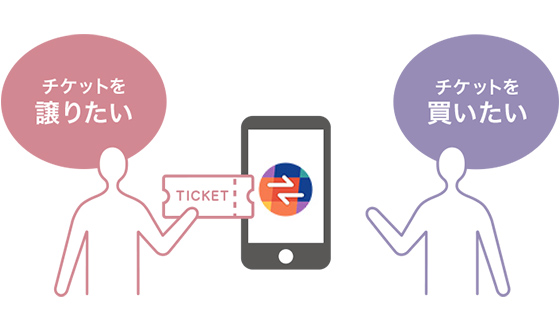
- Ticket trade/resale is based on a lottery system!
- During the trade resale period, a lottery will be held every day at 12:00.
- *You can win if you enter and win, not on a first-come, first-served basis.
- *Customers cannot specify the trade/resale destination.
- Trade and resell tickets at regular price!
- Separately, the following fees will be required.
[Listing] Trade fee
[Successful bid] Trade fee + electronic ticket system usage fee - Winning tickets will be issued as electronic tickets!
- Even if you have won a ticket, you can put it up for sale again within the trading period.
- Notes on trading
- Please note that Ticket Plaza Trade is a service for Japan only, and those who do not have a domestic account cannot sell tickets.
Those who do not possess a bank account in Japan are not eligible to exhibit in Tixplus trade.We appreciate your understanding that the procedure will differ depending on your own situation, as the trade system is a domestic service.
-Detailed information such as the trading period will be announced at a later date. ―
Please be sure to check before applying
- 1.About how to apply
-
Log in with your "Plus member ID" and "password" when applying.
- *You can check your Plus member ID on My Page.
- Please be sure to check your registration information (name in kanji, address, phone number) on your My Page before proceeding with your application.
≫ ZEROSE JAPAN My Page is here
Please make sure that the phone number you enter on the application screen is the same as the phone number of the smartphone device you will be downloading the ticket to. If the phone numbers are different, you will not be able to receive the e-ticket, so please be careful.
- If you have acquired multiple Plus member ID, please contact us using the details below to merge your IDs.
≫For those who have joined a fan club (including fan club services other than ZEROSE JAPAN)
≫If you are not a member of a fan club or do not know which fan club you are a member of.
- 2.About compatible devices
-
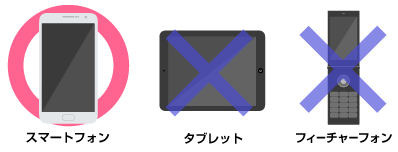
- The "Ticket Plaza Electronic Ticket" app can be used on smartphones with an internet connection and a phone number starting with 090/080/070.
iPhone devices: iOS 13 or later *SMS function required
Android devices: "Android OS 7.0 or higher" *SMS function required
- *Electronic tickets are not compatible with "Garage phones", "Rakuraku smartphones (models released before 2014 that are not compatible with Google Play)", "Garaho", "Tablet devices", and "iPod touch".
Also, some smartphones are not supported. Please be sure to check which models are not compatible. - ※Electronic tickets can also be used on smartphones from overseas. You can enter your foreign phone number on the application form.
If you are not able to receive your ticket on App after the E-tickets are issued, please contact the Tixplus customer support.
≫https://tixplus.jp/support/tixplus_en/
- 3.About email reception settings
-
Information on the start of ticketing will be sent via ``Ticket Pla''.
If you have set up domain-specific reception, please configure your settings so that you can receive emails from "plusmember.jp". Please refer to this page and review your spam email settings.
-
Please check the special website for important information regarding the performance.
Enter the information on the Ticket Pia application screen.
Information about companions
- (1) Plus member ID
- (2) [Smartphone phone number] of the accompanying person who will display the ticket
- (3) Name of accompanying person (kana)
If you enter the wrong Plus member ID or specify the applicant's Plus member ID as a companion, you may be disqualified. Please check carefully before proceeding with your application.
《Before applying for this performance》
Please be sure to read the notes on the previous page and the notes on the special site.
Thank you for your application and purchase.
-
Inquiries regarding new member registration, login, etc.
ZEROSE JAPAN
-
Inquiries regarding applications
Pia
Business hours: 10:00-18:00 (excluding weekends, holidays, and New Year's holidays)
Please write "2024 ZEROBASEONE THE FIRST TOUR [TIMELESS WORLD] IN JAPAN ZEROSE JAPAN Members Pre-sale Inquiry" in the subject line of your email, and be sure to include your question, name, and phone number in the body of the email.
*We cannot answer inquiries regarding application results/lottery methods.
We will not reply to emails that do not include your question (inquiry details). -
Inquiries regarding electronic tickets
Ticket Plaza Customer Support
Business hours: Weekdays 11:00-18:00
Please read the FAQ (Frequently Asked Questions) before contacting us.